
A quick look at Copilot Call Delegation, Personal Attendant, and automatic call recap in Teams Phone
Heads up: Copilot Call Delegation (Personal Attendant) is currently in preview, available only through the Microsoft 365 Copilot Frontier early-access programme.
It is not yet generally available, behaviour can change before GA, and you should treat anything you see in the product as work-in-progress.
If you live in Teams all day, you already know what an unsolicited call costs. It yanks you out of whatever you were doing, kills your concentration, and usually turns out to be something you didn’t need to take. And once you do pick up, you’re trying to listen, take notes and sound coherent all at the same time.
Microsoft is rolling out two updates that take a real bite out of both problems. The first is in preview today through the Microsoft 365 Copilot Frontier programme: Copilot can now answer your incoming Teams calls. It’s called Copilot Call Delegation, and in Teams it shows up as your Personal Attendant. The second is broader and already generally available: Copilot now works properly in 1:1 and PSTN calls, so the notes, recap and actions all get handled for you.
Worth a closer look at both.
1. Meet your new Personal Attendant
Personal Attendant is an AI voice agent, currently in preview via the Frontier programme. It picks up your Teams calls when you can’t, or don’t want to. It runs on your behalf, knows your calendar, and is always on. Four things it actually does:
- Screens calls before they reach you. Spam and likely-fraud numbers never need to ring your handset.
- Asks the caller what they want, so you can decide in seconds whether to take it, defer it, or ignore it.
- Pushes urgent calls through, with the caller’s topic on the incoming notification.
- Books a follow-up in a private Bookings calendar if you’re out. That beats leaving someone with a voicemail.
Callers always hear an announcement and see an avatar telling them they’re talking to an attendant, not to you. You also get a notification every time it acts on your behalf. Nothing happens quietly behind your back.
Rather than explaining it in theory, here’s what this actually looks like in practice.
Our CTO, Rob, walks through how Personal Attendant answers a call, screens the caller and books a meeting automatically.
Microsoft Teams with Copilot can now use AI to screen your calls, answer your calls, take messages and even allow the calling to book time in your diary for a follow-up meeting. Customisable, priority lists, different language support and much more.
All powered by Microsoft Teams and Copilot.
My Personal Attendant Experience
Below is an example of call where I pretended to be a shady salesperson and it immediately flagged it as a potential scam call.
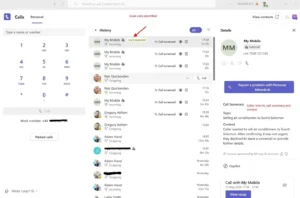
Following are the controls available (currently in preview)
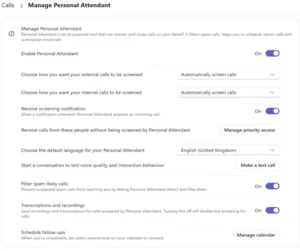
What I like about this screen is that control sits with the user, not the admin. You pick who skips the attendant. You set screening separately for internal and external callers. You choose whether transcripts and recordings get kept. And there’s a test-call button, so you can hear how it sounds before turning it loose on real contacts
2. Automatic recording and recap for 1:1 and PSTN calls
The second piece is just as useful, especially if you live on the phone with customers. Copilot now works in both 1:1 Teams calls and PSTN calls placed through Teams Phone, and it automatically records and transcribes calls—a feature that has previously been absent from ad‑hoc and 1:1 calls.
While this new capability is by no means a replacement for a compliance recording solution, it is still a big win for clients who do not want a recording solution yet still
want all their voice interactions recorded, whether internal or external. Once recording or transcription kicks in, every licensed person on the line gets:
- Live insights during the call. Copilot tracks who said what, flags differing views, and suggests follow-ups while you’re still talking.
- A private prompt window for asking Copilot questions mid-call (“what have we agreed?”, “what’s the customer’s main objection?”) without the other side knowing.
- An automatic post-call recap with key points, decisions and actions, saved in Call history.
- The full transcript afterwards. No more relying on whatever you scribbled down while trying to keep eye contact.
This is new ground for Teams Phone. Up to now, the proper Copilot experience only really worked in scheduled meetings. That same experience now sits behind every ad-hoc 1:1 and every PSTN conversation. In my experience, those are the calls where the biggest decisions get made and the worst notes get taken.
Admins still hold the reins. The calling policy gives you two modes. The first runs Copilot only during the live call and keeps nothing afterwards, which suits tighter compliance setups. The second covers both during and after the call, with the recap and transcript retained under your Purview rules. End-to-end encrypted calls are excluded by design.
3. What you need to turn it on
Capability |
Licensing and prerequisites |
| Copilot in 1:1 Teams calls | Microsoft 365 Copilot add-on per user. Transcription enabled in the Teams calling policy. End-to-end encryption disabled for the call. |
| Copilot in PSTN calls | Microsoft 365 Copilot add-on, plus a Teams Phone licence and a calling plan (Microsoft Calling Plan, Operator Connect, or Direct Routing). |
| Copilot Call Delegation (Personal Attendant) |
In preview, not yet GA. Microsoft 365 Copilot licence required. Currently delivered only via the Microsoft 365 Copilot Frontier early-access programme. Teams app language set to English. Supported on Windows, Mac and Web. Not yet iOS or Android. |
4. So what’s the actual business value?
It’s tempting to write this off as another Copilot demo. I’d push back. The mix of an AI receptionist and intelligent recording on every call quietly solves three things that have annoyed enterprise telephony users for years:
- Focus time. Personal Attendant is the first realistic way I’ve seen to claw back hours from cold callers and spam without going dark on people who actually need you.
- Better conversations. When Copilot takes the notes, you can do what you’re paid for. Listen properly. Ask sharper questions. Stop juggling a notebook.
- A searchable corporate memory. Every PSTN and 1:1 call becomes a transcript, a recap and a set of actions someone else can pick up, audit or push into CRM. Tribal knowledge starts turning into organisational knowledge.
The commercials are simple too. If you’re already on Microsoft 365 Copilot and Teams Phone, most of this is yours for free.
It’s a policy question, not a procurement question. Copilot in 1:1 and PSTN calls is already GA; Copilot Call Delegation itself sits in the Microsoft 365 Copilot Frontier programme in preview for now. Frontier is the only way to get hands-on with it before general availability, and the experience may change before GA.
5. How Cisilion can help
At Cisilion we’re helping customers across the UK roll out Copilot and Teams Phone in a way that actually changes how people work, not just what shows up on the licence report. Here’s where we see this landing fastest, what it can take off your bill, and where we plug in beyond the policy toggle.
Where this lands first
The pattern we keep seeing is that the biggest wins aren’t horizontal. Specific roles will get hours back the first week:
- Sales and account managers. Every inbound call recapped automatically, with actions ready to drop into the CRM.
- Executives and their PAs. Personal Attendant filters the noise and books callbacks without a human gatekeeper.
- Field engineers, surveyors and consultants on the move. Calls get captured properly without anyone trying to type while driving.
What you might stop paying for
This isn’t a compliance recorder and we wouldn’t sell it as one. But for organisations who bought tooling just to get notes, transcripts and a searchable history of calls, a few line items start to look optional once Copilot is doing the same job inside Teams Phone:
- Standalone AI note-takers and meeting bots that dial into calls just to transcribe.
- Non-regulated call recording add-ons bought purely for internal training or QA.
- Conversation-intelligence point tools layered on top of telephony for sales coaching.
- Voicemail-to-text services and external receptionist or screening apps.
If any of those are sitting in your renewal pile, this is a good moment to revisit the business case. Regulated call recording for customer service, FCA, MiFID II or healthcare workloads is a different conversation and we’d still point you at a proper compliance recorder for that.
Where else Cisilion plugs in
Turning these features on is the easy part. Getting real value out of them usually touches a few other things at the same time:
- Teams Phone migration. Moving off legacy PBX, Skype for Business, or a hosted voice platform onto Microsoft Calling Plans, Operator Connect or Direct Routing, done in a way that preserves numbers, call flows and user experience.
- Contact centre and CRM integration. Wiring Teams Phone into Salesforce, ServiceNow or a Teams-native contact centre so the recap and actions land where the work actually happens.
- Copilot adoption. Licence assignment is not adoption. We run scenario-based enablement, champions programmes and measurement so you can prove the value, not just the spend.
- Teams rollout and modernisation. Meeting rooms, devices, governance, lifecycle and Purview policies the unglamorous work that decides whether Copilot ends up trusted or quietly switched off.
- Security and compliance review. Aligning recording, transcription and retention with your DLP, sensitivity labels and Purview rules before users notice the difference.
Why Cisilion
We’re a Microsoft Solutions Partner with a Teams Phone advanced specialisation and one of the longest track records in the UK for delivering Teams Phone and Microsoft 365 Copilot at scale.
We’ve been in the Microsoft 365 Copilot Frontier programme since early access opened, which means we’ve already broken these features on lab tenants so your users don’t have to.
If you want a partner who has actually run this in anger — not one reading the same product page as you — that’s the bit we’d quietly point at
Get in Touch
If you’d like to see Personal Attendant and automatic call recap configured against your own policies, or you want help building the wider case for Copilot on Teams Phone, talk to your Cisilion account team and we’ll set up a working session.